
RAW or TIFF in CaptureOne for Film Simulation
Using Our ICC Profiles on RAW Files in Capture One — What to Expect and What to Do If you’ve…
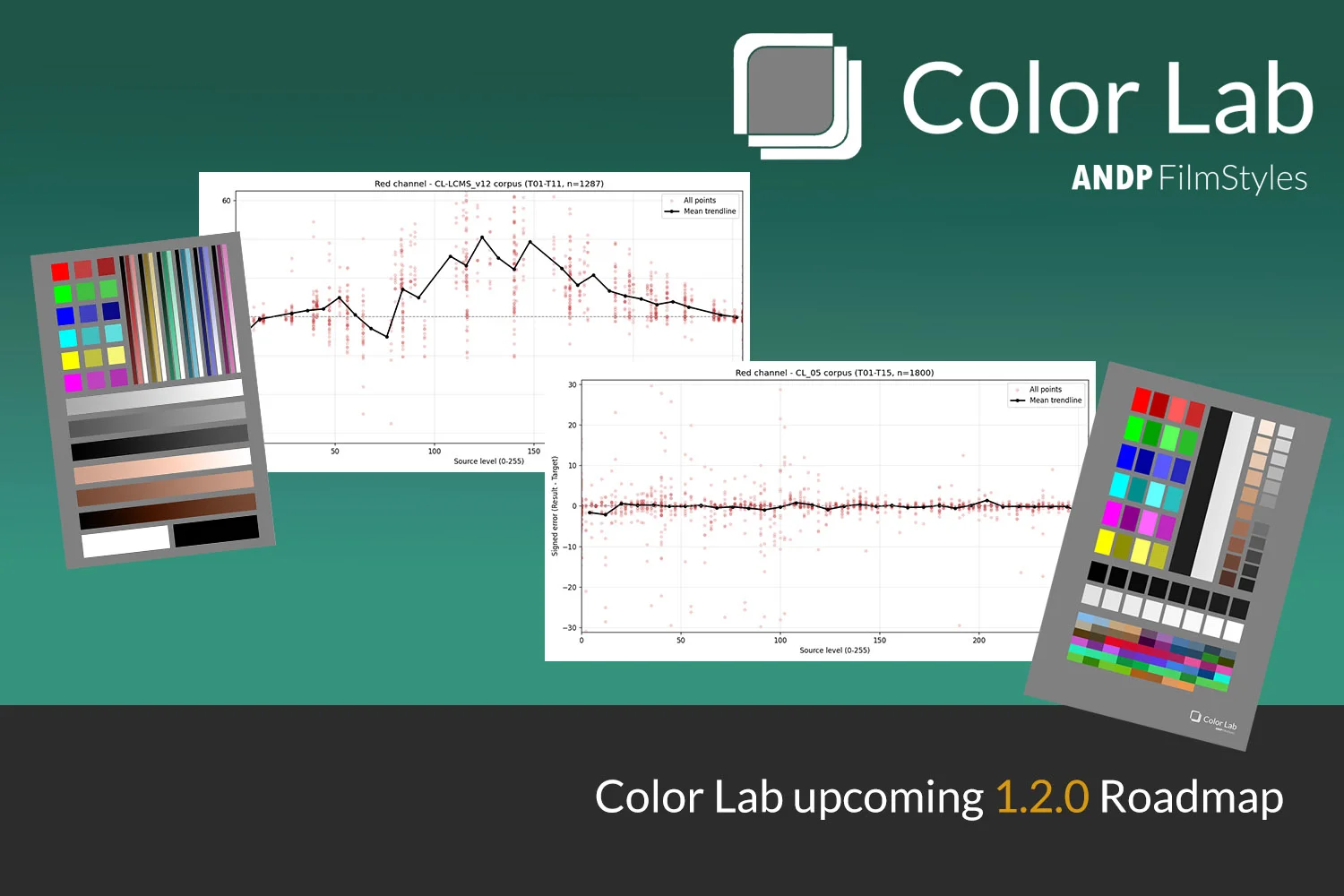
It has been almost 10 days since Color Lab released and the experience has been a truly amazing one. First, the adoption was higher than anticipated, and I am not referring to a quantitative perspective but rather a qualitative one.
While developing Color Lab, I was solving a problem I had in my workflow, not being able to use my LUTs inside Capture One. So basically what I was doing was solving the problem with my own algorithm, while at the same time refusing to use other apps, all paid and refunded, that promised Capture One compatibility but ended up falling short in terms of accuracy.
So the app ended up having better accuracy, it was released, and the first feedback cycle arrived. One of the most interesting conversations happened inside the Technical group for Capture One on Facebook. Someone pointed out using 3D LUT Creator for exporting the .ICC profile of a loaded LUT, claiming the result would be 99.50% accurate.
This was a serious claim and too bold to leave untested. I asked a friend who used 3D LUT Creator to convert a corpus of test LUTs for me. The corpus covered everything, Film Simulation LUTs, delog LUTs, BW LUTs, IR LUTs and extreme technical LUTs developed specifically to stress test ICC conversion.
The results returned, and I used Color Lab’s own diagnostic to measure them.
3D LUT Creator uses a single step mathematical converter that shares common ground with Capture One’s own rendering pipeline. The average ΔE in the corpus came in near 2.20ΔE, roughly 99.15% accuracy on a 255 denominator. Lower than the forum claim, but still competitive.
Color Lab at the time of writing, 1.0.2 for Mac and 1.0.1 for Windows, achieves a weaker initial conversion (Fast method) and then relies on a calibration step (Balanced) to close the quality gap, ultimately beating 3D LUT Creator by a meaningful margin in Perfectionist mode. But, it is not a single step solution, and the margin, while real, motivated a harder look at the pipeline.
My next steps were to fully re-examine everything: the initial conversion engine, the calibration engine, and the diagnostic and calibration measurement system itself.
At the same time, a second problem surfaced, one I had patched for the initial release but not fully resolved. Without going into the internal details of how Capture One handles certain ICC profile instructions, there is a known behavior at the highlight end of the tonal range that can produce visible banding when a LUT moves specular highlights significantly. Both issues were substantial enough to deserve their own dedicated work, and together they defined the scope of 1.2.0.
The method was to apply the LUT corpus, 11 LUTs, to a statistical scatter analysis. This would reveal how 3D LUT Creator’s conversion distributed error across the tonal range per channel, and set that as the baseline to catch and surpass.
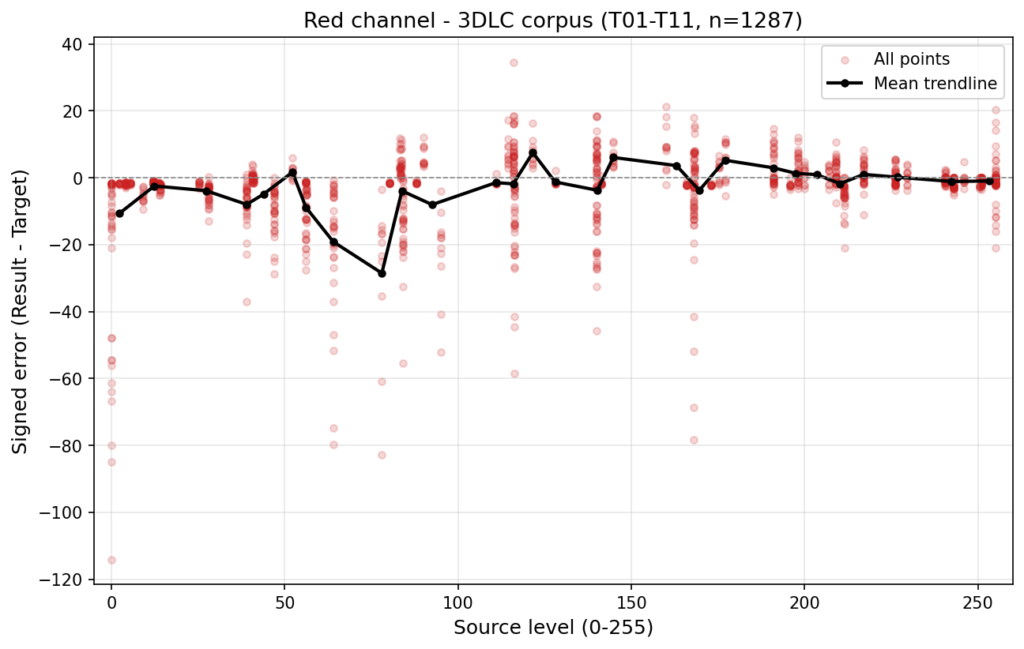
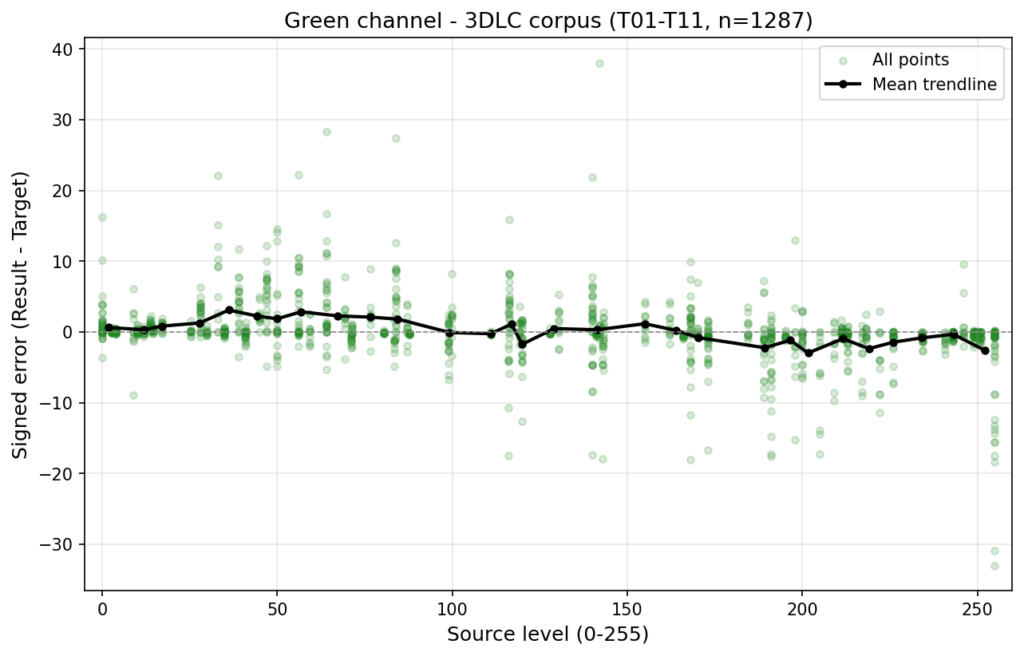
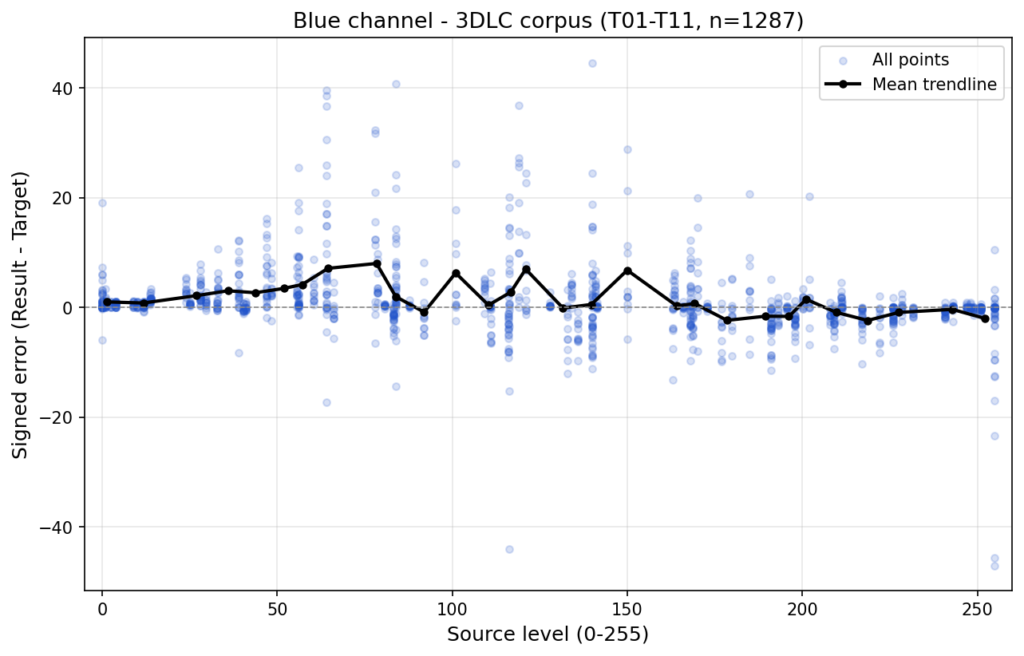
Scatter analysis on a conversion this close to perfect is subtle. The differences are thin but present and measurable. The charts set clear targets.
The existing “Fast” conversion step allowed for a direct comparison with 3DLC. Pre-calibration, 3DLC was ahead, which is a remarkable result for a 10 year old application. Rather than simply patching the existing engine, I chose to redesign it from the ground up.
The redesign went through four iterations. Each iteration targeted the fundamental mathematical choices inside the conversion itself. Not compensation curves applied on top, but the inherent algorithmic decisions that determine how color data is interpreted and mapped. Getting these right is genuinely difficult. The first iteration produced results that were visibly worse before they got better, which is expected when reworking the foundation rather than patching the surface.
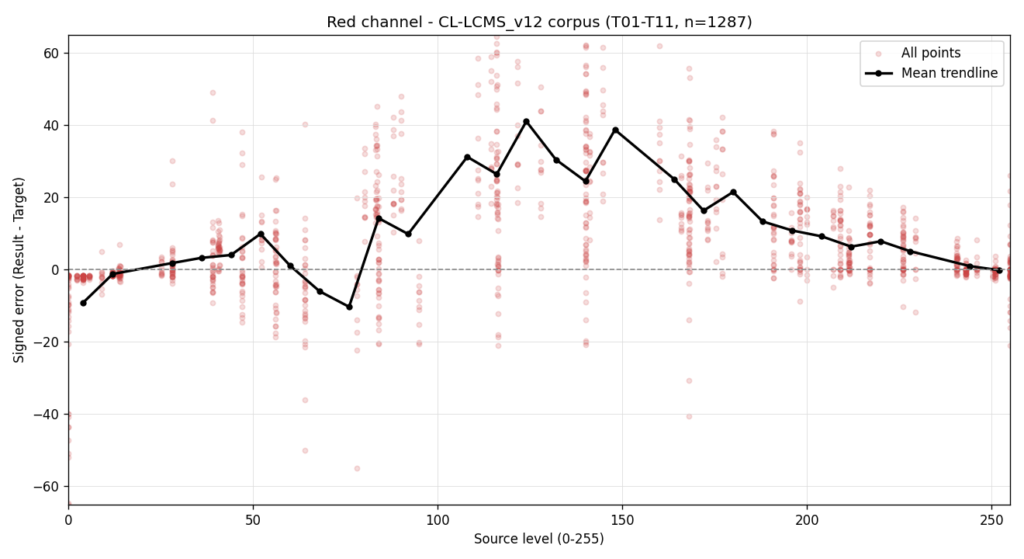
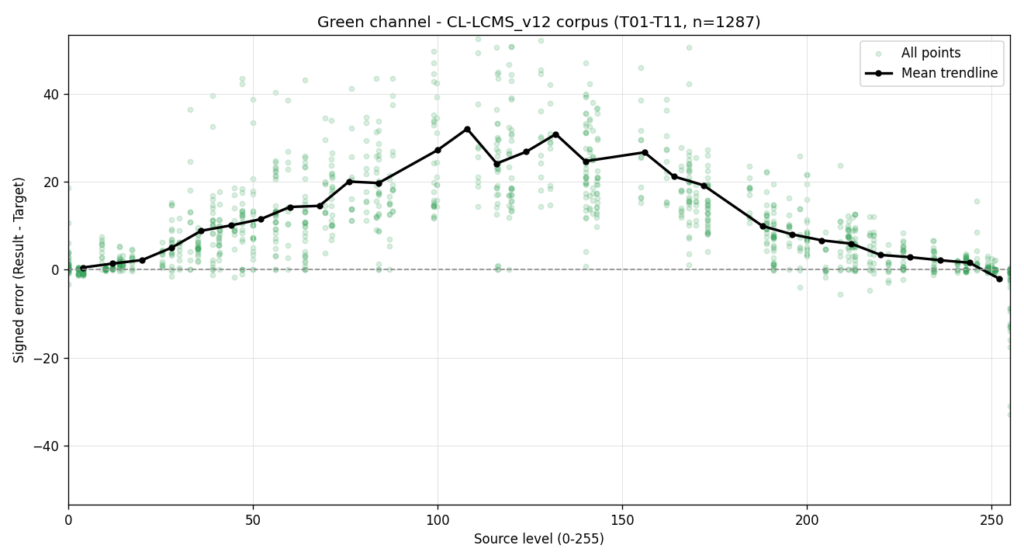
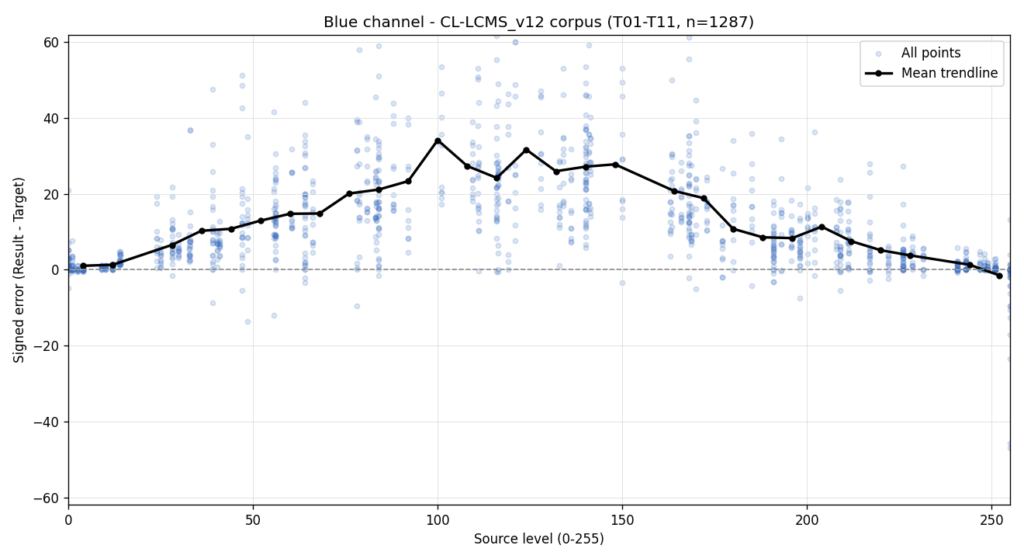
After three additional rounds of refinement, each measured against the full corpus and against Capture One’s live output, the conversion finally crossed the line and edged ahead of 3DLC on a direct fast conversion basis, without calibration applied.
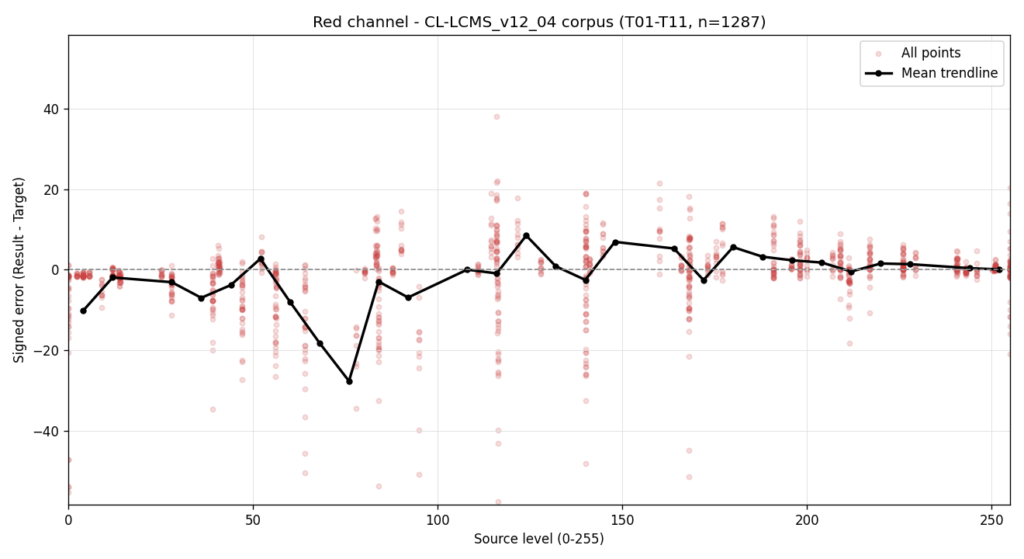
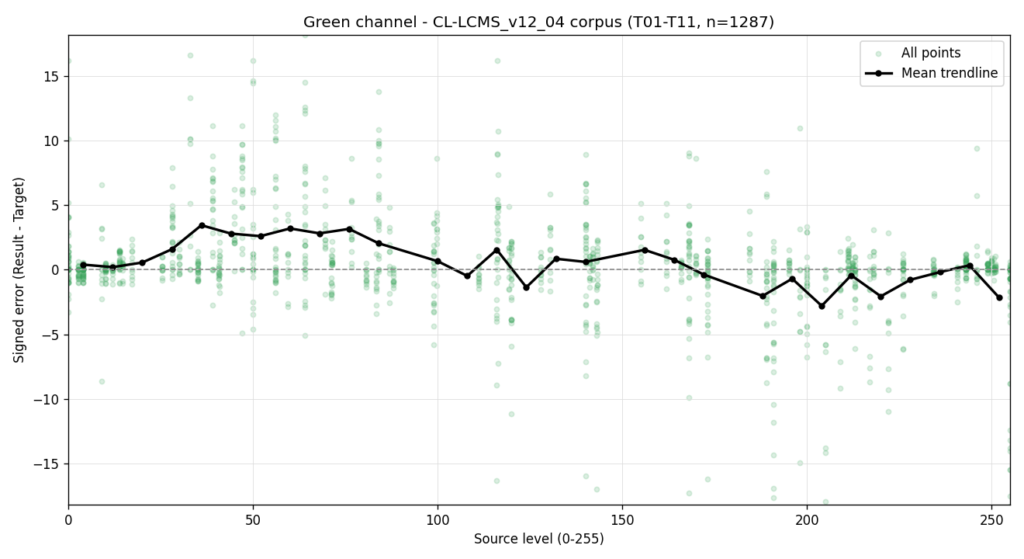
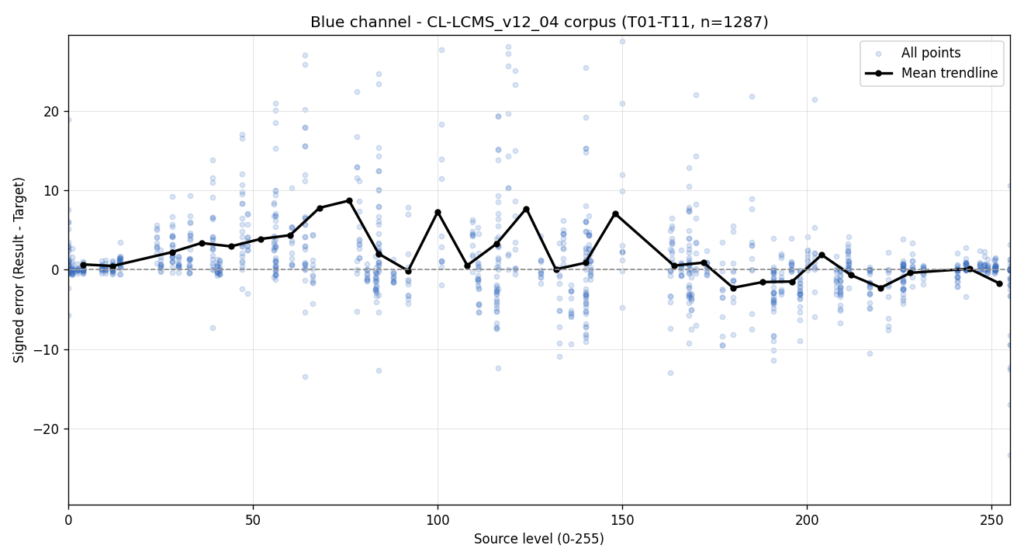
The mean trendline behavior was noticeably cleaner across all three channels. The margin was slim, but it was consistent.
During this process I noticed something unexpected in the scatter plots. Certain abrupt shape anomalies in the data were not coming from the conversion algorithm at all. They were coming from the color card.
ColorCard9000, the reference card Color Lab uses to measure and calibrate against Capture One’s output, was built around gradients. Under normal measurement conditions this works well. But under this level of scrutiny, the gradient design left visible gaps in the per channel probe coverage. Certain tonal ranges simply were not being sampled densely enough, and those gaps were appearing as false signal in the analysis.
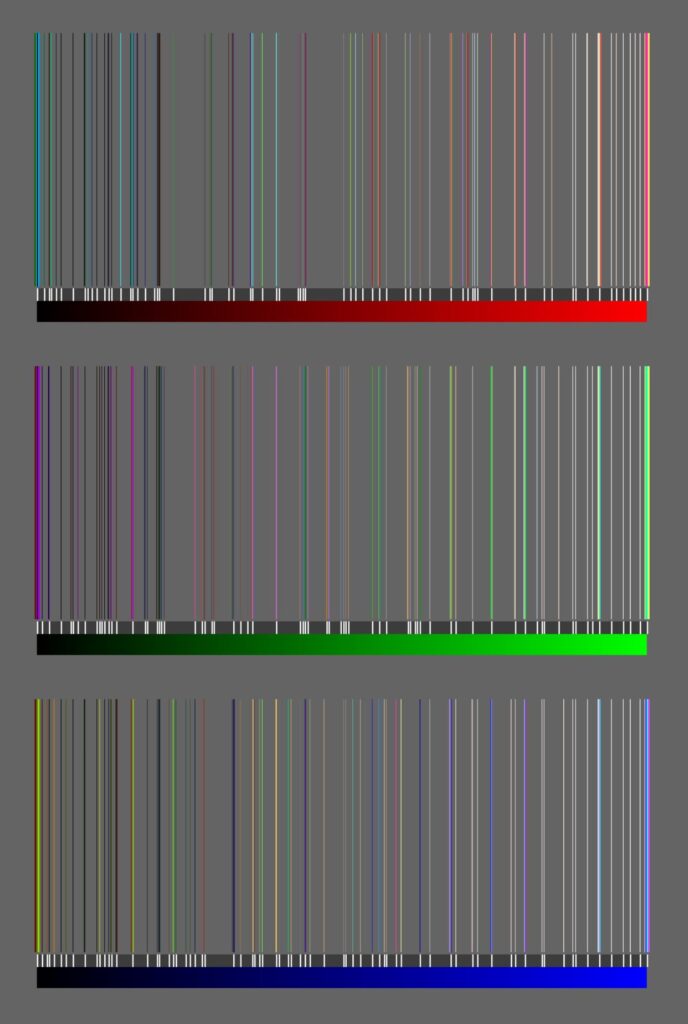
This meant the measurement tool itself was obscuring real results. Before proceeding further, the color card needed to be redesigned.
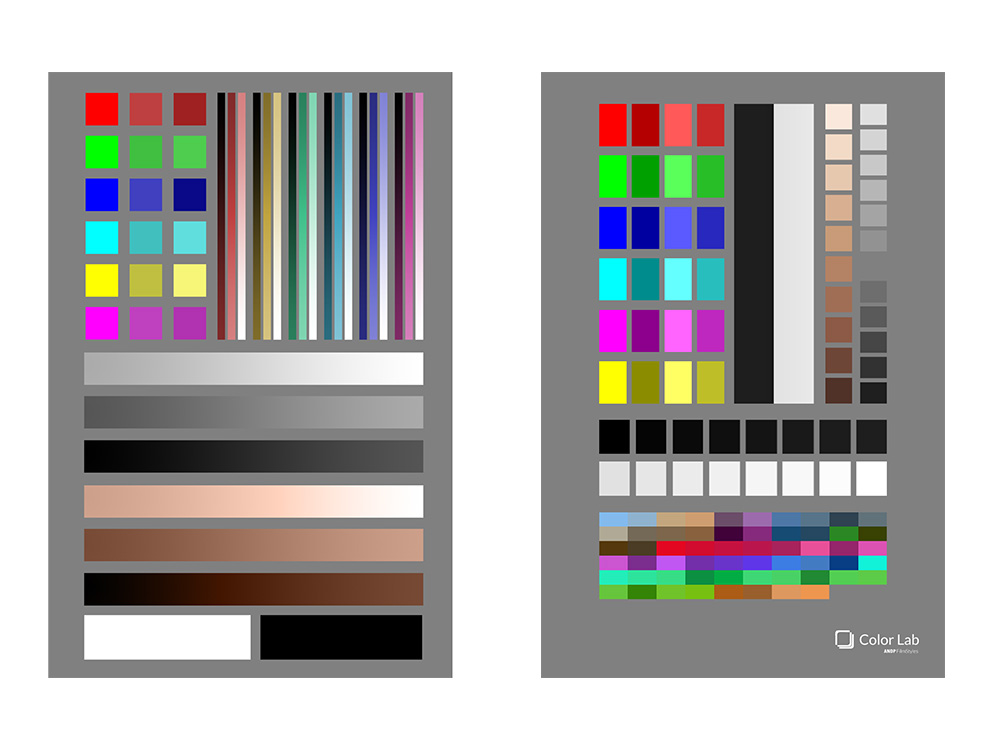
The new design replaced gradients with discrete, carefully placed barriers. The only exceptions are two specific visual indicators at the tonal extremes. These serve as detection sentinels that allow Color Lab to identify a known highlight behavior in Capture One and take an appropriate corrective action, rather than assuming the ICC was read as intended.
Skin gradients were replaced with skin swatches. The remaining space was filled with a computed set of color guards chosen to distribute coverage as evenly as possible across the full RGB scale, addressing the gaps that ColorCard9000 left behind.
The result was a measurement system with substantially better coverage and no blind spots.
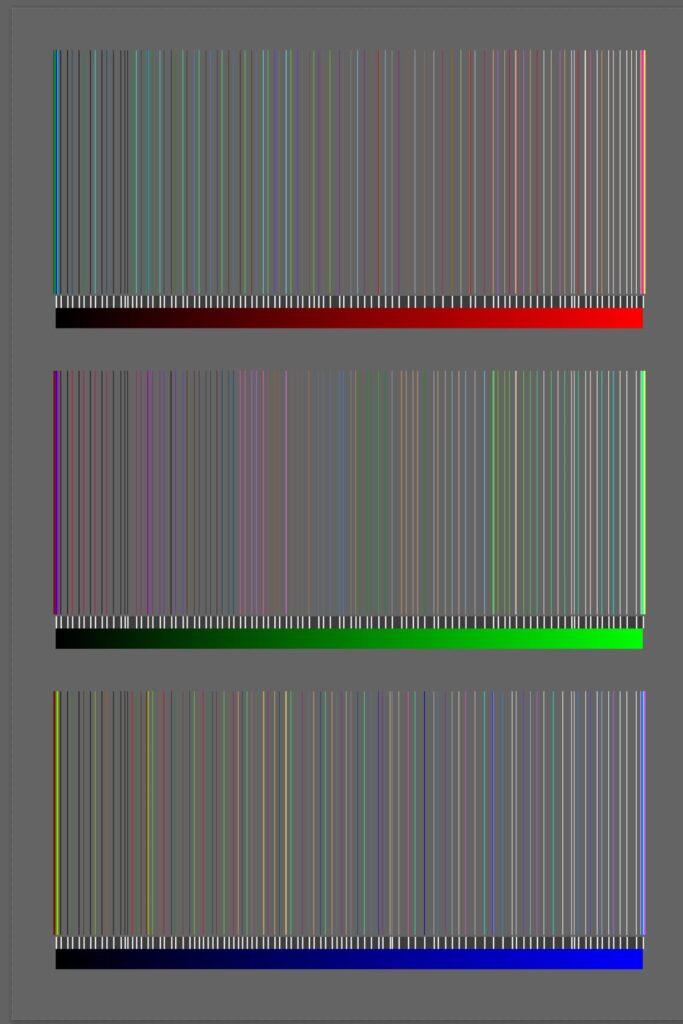
It is the kind of thing that is easy to overlook. The measurement tool and the thing being measured can interact in subtle ways, and fixing the tool changes what the data tells you.
With the new color card in place and the new conversion engine running, the existing calibration algorithm, which had served 1.0.1 and 1.0.2 well, was no longer the right fit. It had been designed to handle larger initial error margins. With a significantly more accurate starting conversion, it was correcting too aggressively in some areas and not enough in others, effectively causing a regression instead of an improvement.
A new calibration algorithm was developed specifically to work with the smaller error margins the updated conversion now produced. This required multiple iterations measured against the full corpus, refining the correction behavior until it was complementary rather than counterproductive.
When it clicked, the improvement was immediate and significant. It was the first time Color Lab returned a mean ΔE below 0.5.
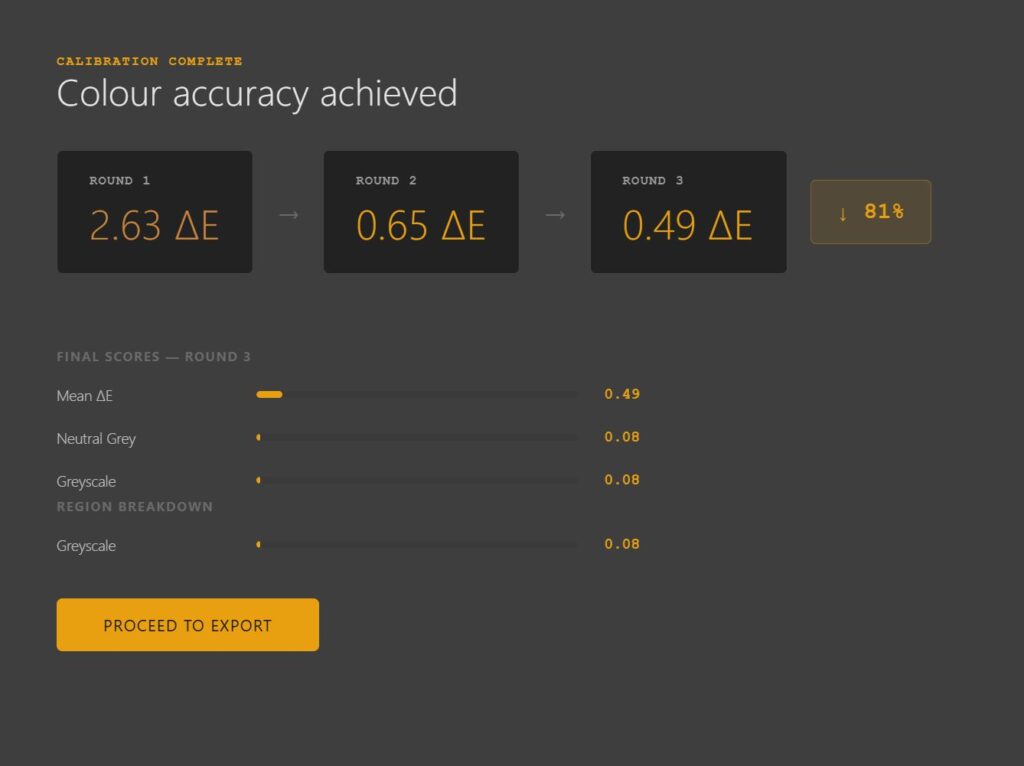
A second test confirmed the result was valid and held across the full color card.
With the engine and calibration confirmed, I expanded the test corpus to 15 LUTs, adding monotonic hue shifts, infrared, extreme hue and black and white conversions, specifically intended to try and break the system.
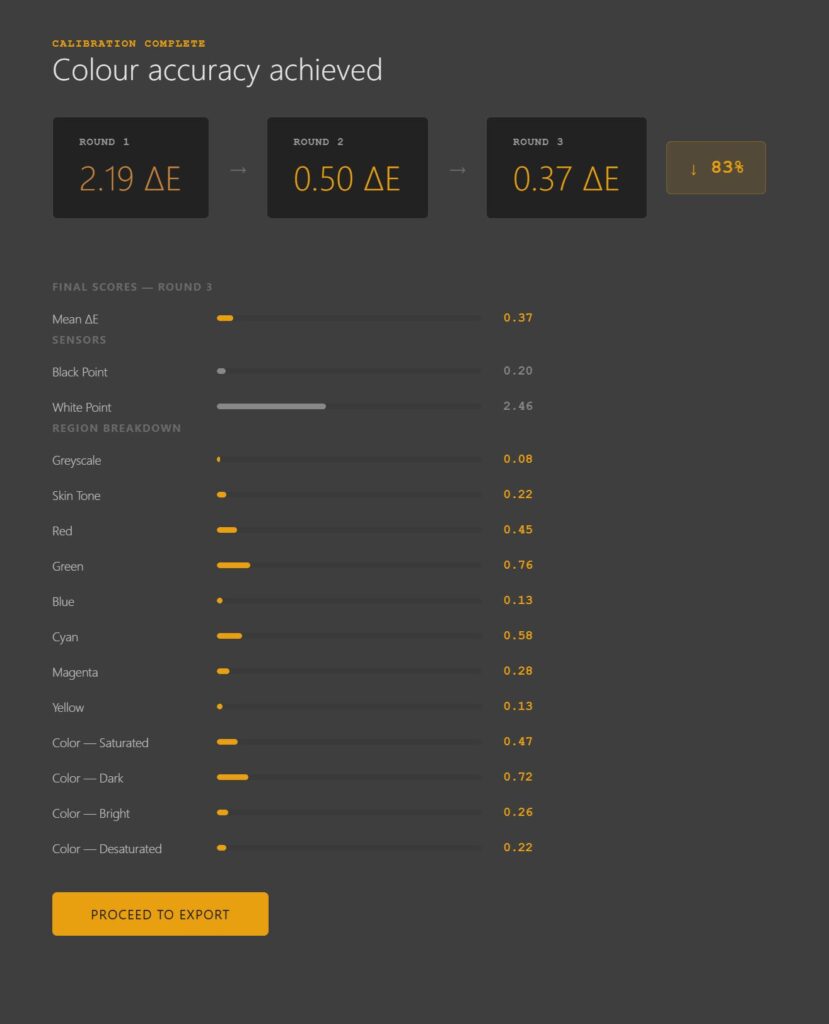
The results held. Across all regions, greyscale, skin tone, primaries, secondaries, saturated, dark, bright and desaturated color, the calibration delivered. The scatter plots across all three channels showed the mean trendline tracking the zero line cleanly across the full tonal range, even with the stress test LUTs included.
And the final scatter analysis charts of Color Lab.
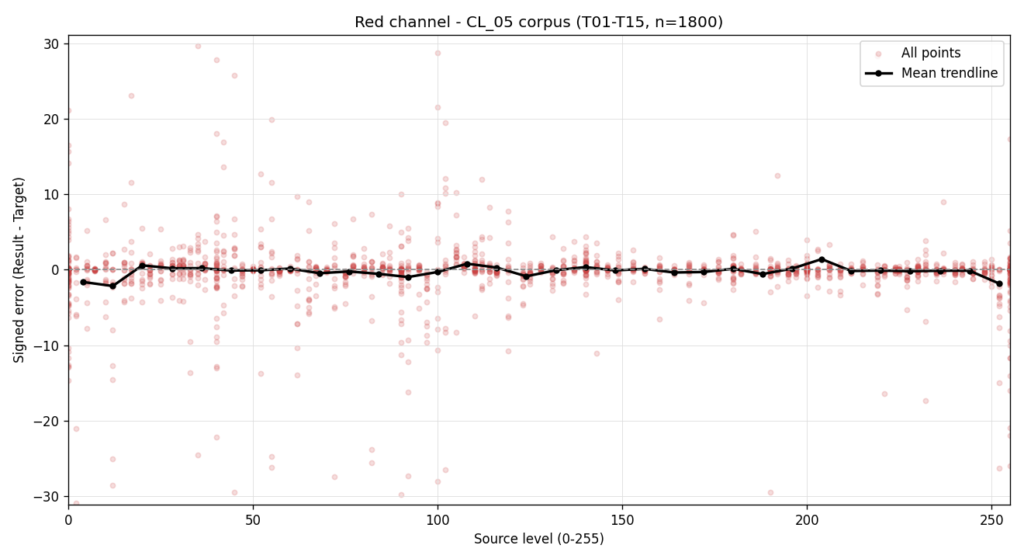
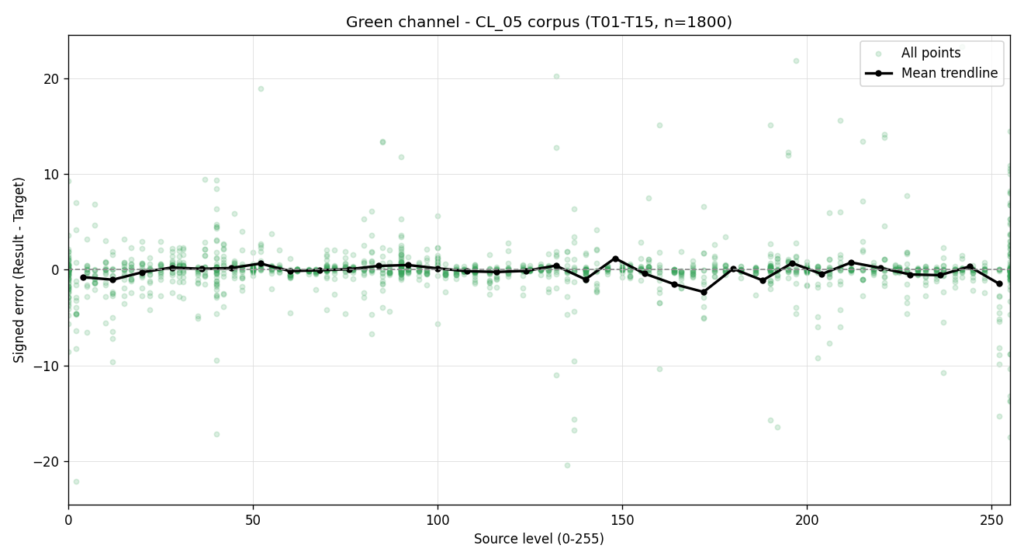
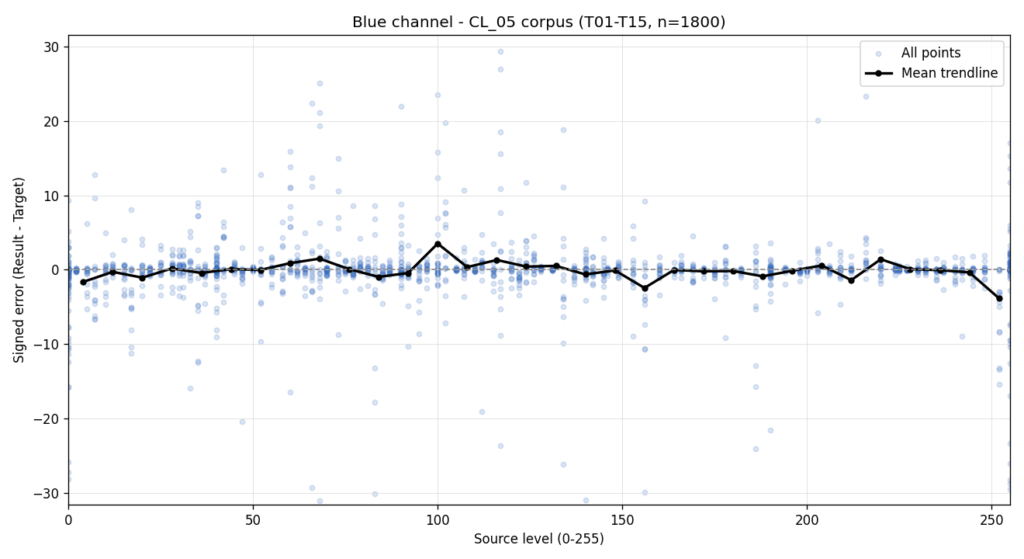
The highlight behavior issue is the remaining open item. The solution chosen is a detection path that identifies when the condition is present and generates the appropriate corrective output inside Capture One directly, rather than attempting to force the ICC to behave in a way Capture One will not honor.
That work, along with official Intel Mac support, completes the 1.2.0 roadmap.
It will be with you in a few days, so watch for the update button.
Thank you for reading.
Using Our ICC Profiles on RAW Files in Capture One — What to Expect and What to Do If you’ve…
If you’ve ever asked me for “the recipe,” you’re not alone — it’s probably the most common question I get.…
